
Elisity Policy Deployment & Design Guide
Comprehensive guide to identity-based microsegmentation
Version 0.2 • Draft for Internal Review
Introduction
What is Identity-Based Microsegmentation?
Traditional network security relies on IP addresses and VLANs to control access. This approach has a fundamental problem: IP addresses don't tell you who or what is communicating—only where traffic is coming from.
Identity-based microsegmentation changes this paradigm. Instead of asking "Is this IP address allowed to talk to that IP address?", Elisity asks:
"Can this nurse's workstation access the pharmacy system?"
This shift—from location to identity—makes policies intuitive, portable, and dramatically easier to manage.
Why Elisity is Different
| Traditional Approach | Elisity Approach |
|---|---|
| Agent-based | Agentless |
| Requires network changes | Works with existing infrastructure |
| Centralized enforcement | Distributed edge enforcement |
| IP-based rules | Identity-based policies |
| Complex rule management | Visual policy matrix |
Elisity transforms your existing access switches into policy enforcement points. Your Cisco, Arista, Juniper, or HPE Aruba switches become intelligent security controls—no new hardware required.
The Virtual Edge is agentless and out-of-band—it is never in the data path. It programs your existing Cisco, Arista, Juniper, or HPE Aruba access switches with identity-based groupings and policies, and the switch itself performs enforcement natively. No new hardware and no inline appliance are introduced.
The Core Promise
👁️ Visibility
See every device, user, and application on your network with rich identity context from AD, CMDB, and device inventory integrations.
✨ Simplicity
Build policies using natural groupings (by device type, department, function) instead of IP addresses.
🛡️ Confidence
Test policies in simulation before enforcement, with AI-powered recommendations from Insights.
Core Constructs
How Policy Works in Elisity
At its simplest, an Elisity policy answers one question:
"Can assets in Group A communicate with assets in Group B, and if so, how?"
Figure 1: Policy = Source Policy Group + Security Profile + Destination Policy Group
Policy Groups: The Foundation
Policy Groups answer the question: "Which assets should receive the same security treatment?"
There are four complementary ways to build a Policy Group. Most deployments combine all four: identity-based dynamic matching covers the majority of devices, while user, subnet, and label-based groups fill specific gaps.
| Method | Groups by | Primary identifier | Flexibility | Ideal use case |
|---|---|---|---|---|
| Dynamic (Identity-Based) | "What" the device is | Device attributes (Category, Type, Vendor, OS, Risk) | High (automatic) | Verified / Unverified IT, IoT |
| User-Based | "Who" is logged in | AD / Entra ID user identity (e.g., AD group) | High (follows the user) | BYOD, knowledge workers |
| Static (Subnet-Based) | "Where" it connects | IP address / subnet | Low (fixed) | Guest WiFi, datacenter subnets |
| Custom (Label-Based) | "Why" (business context) | Imported business labels (e.g., "Mfg Line 1") | High (manual / API-driven) | OT, custom device groups |
User-Based Policy Groups
User-Based Policy Groups classify by who is logged in, using user identity from Active Directory or Entra ID (for example, membership in an AD group). The classification follows the user across devices and locations, which makes it the right fit for BYOD and knowledge-worker access.
Custom (Label-Based) Policy Groups
Custom Policy Groups classify by why a device matters in business terms, using imported labels (for example, "Mfg Line 1") applied manually or through the API. They are the primary pattern for OT zones and other device groups that do not map cleanly to a discovered attribute.
IdentityGraph: The Source of Truth
Before understanding Policy Groups, it's essential to understand IdentityGraph—the identity engine that powers dynamic classification.
IdentityGraph is an intricate mapping service that dynamically constructs a holistic view of every entity in your network. It doesn't just see devices; it perceives relationships, roles, and patterns by aggregating data from multiple sources.
Attribute Layers in IdentityGraph
| Layer | Source | Examples |
|---|---|---|
| Core Effective Attributes | Aggregated from all sources, used for policy matching | Device Type, Category, Vendor, OS |
| Connector Attributes | Specific identity sources (ServiceNow, CrowdStrike, Claroty, etc.) | CMDB CI, Risk Score, Asset Group |
| Elisity Native | Discovered via traffic analysis and ML classification | MAC OUI, Traffic Patterns, DHCP Fingerprint |
| Manual Attributes | Administrator-assigned values | Custom Tags, Identity Tags, Labels |
Dynamic Policy Groups
Dynamic Policy Groups classify assets automatically using IdentityGraph attributes as match criteria:
    As devices are discovered, IdentityGraph enriches them with attributes from connected identity sources. The Identity Engine then evaluates devices against your Policy Groups and automatically assigns them based on match criteria.

    Match criteria can leverage:
- Core effective attributes — Device Type, Category, Vendor, OS (recommended for most use cases)
- Connector-specific attributes — ServiceNow CI Class, CrowdStrike Risk Score, Claroty Asset Type
- Active Directory attributes — User, User Groups, OU
- Network attributes — VLAN, Site Label, Distribution Zone
Static Policy Groups
Static Policy Groups classify assets by network location (IP/subnet) when identity-based classification isn't available or appropriate:
    Global vs Local Policy Groups
    Policy Groups can be scoped globally or locally based on organizational needs:
| Type | Scope | Use Case |
|---|---|---|
| Global Policy Groups | Apply across all sites and VENs | Standard device types (Printers, IP Phones, Workstations) |
| Local Policy Groups | Apply only to specific Site Labels | Site-specific OT equipment, regional compliance requirements |
Evaluation Order: When a device is evaluated for Policy Group matches, local Policy Groups are evaluated first. If no local match is found, the device is evaluated against global Policy Groups. This local-first evaluation ensures site-specific rules take precedence.
Connector Precedence & Core Effective Attributes
Several attributes overlap across connectors—Category, Type, Vendor, Model, and OS can each be reported by more than one source. When sources disagree, the higher-ranked connector wins, and that value becomes the Core Effective Attribute used for policy matching. For example, if CrowdStrike reports Category = PC while another source reports Server, the Core Effective Category is PC when CrowdStrike is ranked higher.
Type is a subset of Category—every Type rolls up to one of 12 Categories.
Recommended Connector Ordering
The order is customizable (only "Manually Configured" is fixed at the top). A common starting point:
- Manually Configured (fixed at the top)
- Microsoft AD / Entra ID
- Microsoft Intune
- CrowdStrike or SentinelOne
- Custom Connectors (use-case dependent)
- Cyber-Physical Systems (Claroty / Armis / Ordr / Nozomi / Dragos)
- Microsoft Defender for Endpoint
- Elisity Native Discovery
- ServiceNow
You can also pull a specific attribute directly from a chosen source rather than relying solely on the precedence order.
Connector Order of Precedence diagram
Verified vs. Unverified Devices and Trust
A Verified device is one registered in a verified system of record. A representative customer definition: an HMI, PLC, laptop, tablet, IoT/IIoT device, server, printer, or phone on the internal wired or wireless network that is registered in any verified system of record.
Trust recommendations (used as match conditions when building Policy Groups):
- Known in Active Directory and/or Entra ID
- Known in CrowdStrike or SentinelOne
- Known in ServiceNow
- Known in Intune (add an AND "Compliant" condition)
- Known in Microsoft Defender for Endpoint (add an AND "Onboarded" condition if Defender scans same-VLAN devices)
Match criteria support AND / OR / CONTAINS / NOT across any attribute, static or dynamic.
Policy Group Ordering
A device belongs to exactly one Policy Group at a time, and it can move between Policy Groups as its conditions change. Higher stack-ranked Policy Groups are matched first. The hard ordering, top to bottom, is:
- Local Policy Groups (site-matching)
- Global Static Policy Groups with priority enabled
- Global Dynamic Policy Groups (admin-ordered)
- Global Static Policy Groups with priority disabled
- Unassigned
- Internet
A device that is locked to a Policy Group stays there regardless of dynamic attribute changes.
Genre Tagging
Each Policy Group can be tagged with a genre—IT, OT, IoT, or IoMT—for dashboard filtering and reporting.
Baseline Policy Groups
After VEN onboarding, CCC suggests Baseline Policy Groups (IT, IoT, OT, IoMT) derived from the Categories and Trust of the discovered devices. Customers can edit and extend these as classification matures.
Recommended Baseline Custom Policy Groups
- Quarantine — label-based; Deny-All to every Policy Group
- Bypass — label-based; temporary Allow-All
- Internet-Only — label-based; allows only Internet plus DHCP/DNS
Recommended Baseline Static Policy Groups
- Guest networks
- BYOD (if applicable)
- Datacenter
- Remote-Access VPN
- Intranet (RFC 1918 plus org-owned public space used internally)
- Site-to-Site / B2B VPNs
Prioritize the Guest and BYOD static groups above the Dynamic Policy Groups.
Unassigned vs. Unclassified
Unclassified refers to a missing or unknown device attribute (Vendor, Type, Category, Model, or OS). Unassigned refers to a device that matches no Dynamic or Static Policy Group. Unassigned devices still appear in the Matrix and receive Security Profiles and policies like any other Policy Group.
Security Profiles: The Rules
Security Profiles define what traffic is allowed between Policy Groups:
The Policy Matrix
The Policy Matrix visualizes all Policy Groups and their relationships:
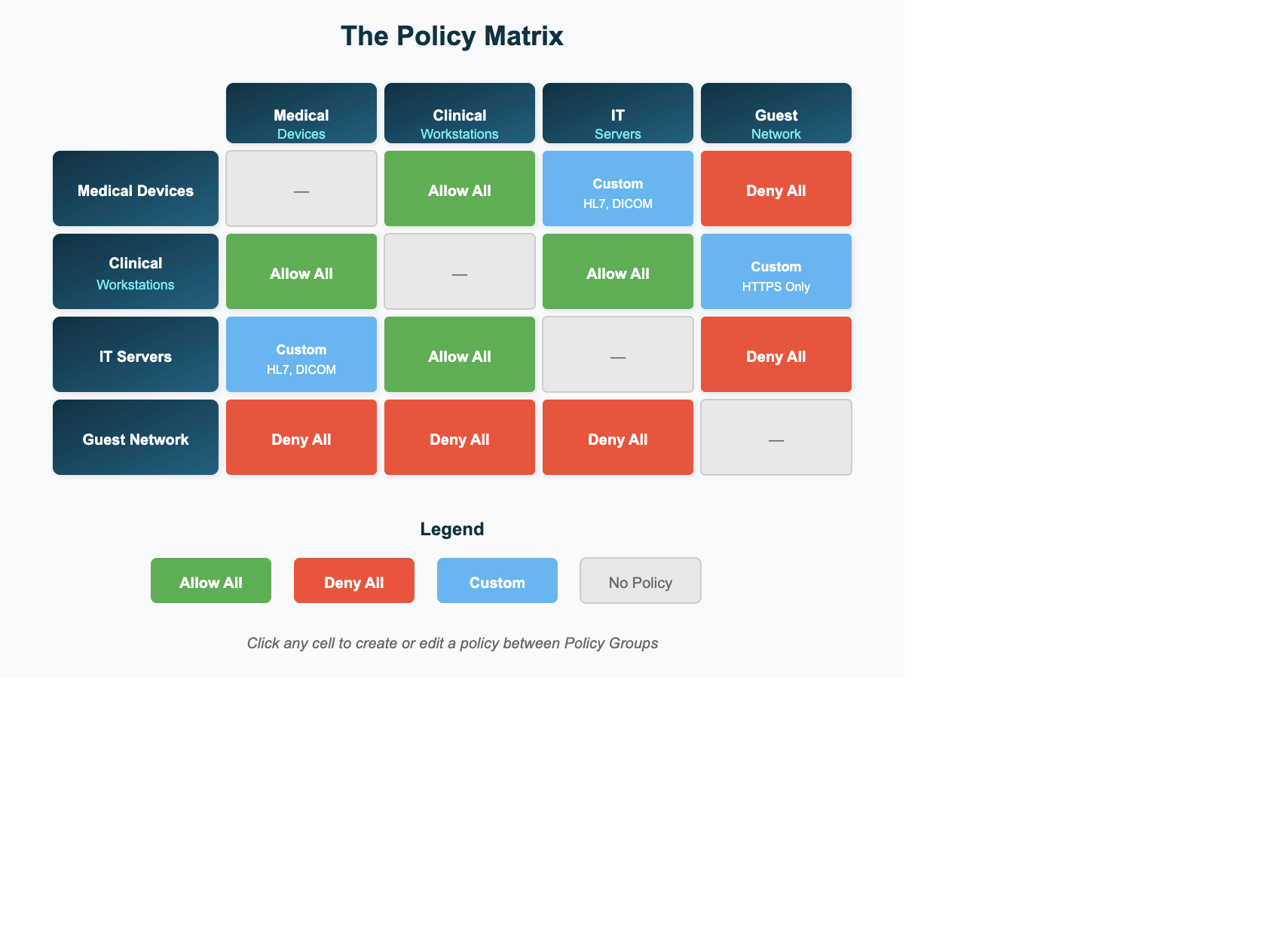 Figure 2: The Policy Matrix showing Allow (green), Deny (red), Custom (blue), and No Policy (gray) states
Each cell in the Matrix carries one of five policy states:
Allow — communication between the two Policy Groups is permitted
Deny — communication is blocked
Custom — a Security Profile permits or blocks specific ports and protocols
Independent Control — Elisity is intentionally not enforcing between these Policy Groups; a third-party control (for example, a firewall) governs this path
No Policy — no decision has been made yet for this pair
⚠️ Key Insight
Empty cells (no policy) default to Allow. This is intentional—Elisity is designed for gradual adoption, not big-bang enforcement.
Policy Lifecycle
Elisity policy deployment follows a natural progression:
Phase 1: Discover
Goal: Gain visibility into all assets
- Deploy Virtual Edges
- Onboard switches as VENs
- Enable discovery & telemetry
- Connect identity sources
Phase 2: Classify
Goal: Organize assets into Policy Groups
- Review Insights suggestions
- Create Dynamic Policy Groups
- Assign Security Levels
- Reduce Unassigned to <20%
Phase 3: Define
Goal: Specify communication rules
- Build Security Profiles
- Deploy policies via Matrix
- Use Traffic Analytics
- Start broad, refine later
Phase 4: Simulate
Goal: Validate without blocking
- All policies in Simulation Mode
- Monitor Traffic Analytics
- Use Traffic Review
- 7-30 days observation
Phase 5: Enforce
Goal: Activate validated policies
- Transition to Active
- Start with low-risk
- Monitor for blocks
- Target: 75%+ Score
Discovery Requirements
A device must have both an IP address and a MAC address to show as online in CCC. Attachment is confirmed through the Device Tracker (state REACHABLE) and, on Cisco switches, via CDP/LLDP. Identity matches occur by IP+MAC, MAC-only, or—optionally—IP-only (for example, when correlating ServiceNow with CrowdStrike).
Data Analytics
Discovery and policy activity are not only visualized in CCC—analytics and logs can be exported to a SIEM for correlation and long-term retention.
Security Profiles in Depth
Security Profiles are sets of Layer 4 port and protocol rules. Each profile follows one of two patterns: allow these ports and deny the rest, or deny these ports and allow the rest. Saved profiles are reusable across any cell in the Matrix.
| Profile example | Pattern |
|---|---|
| Printer Services | Allow the printer ports; deny everything else |
| Block Abused Services | Block commonly abused Windows services; allow everything else |
Reading the Traffic Matrix
The Matrix uses a consistent visual language:
- Green — allowed Layer 3 communication
- Red — denied Layer 3 communication
- Blue — Layer 4 rule (a mix of allow and deny)
- Outlined cell — policy is in Simulation
- Filled cell with a shield — policy is Active (enforced)
- Blank cell — no flows observed during the selected window
Replica Policy Sets
A Replica Policy Set mirrors a Standard Policy Set's Policy Groups but keeps the entire matrix in Simulation. You can create up to 5 replicas per Standard set—useful for migrating sites or waves into enforcement with confidence while the Standard set continues to operate. Policy Sets can also be duplicated or cloned, and custom views help focus on a subset of the matrix.
Insights
Elisity's Insights engine uses machine learning, traffic analysis, and an LLM-powered classification system to accelerate your microsegmentation journey.
Enabling Insights
- Navigate to Settings → System → Advanced
- Scroll to the Insights section
- Toggle Enable Insights
Screenshot Placeholder
CCC Settings → Advanced → Enable Insights toggle
How Device Classification Works
When a device is discovered without a known category, the Insights engine uses a multi-step process:
-
Discovery: Device appears in Identity Graph with
normalizedClass = UNCLASSIFIED - Cache Period: Device waits in memory cache (default 5 minutes) to allow identity sources to classify it
- Evidence Gathering: If still unclassified, the LLM agent gathers evidence from three tools
- Classification: LLM analyzes evidence and proposes a device category
- Adjudication: User accepts or rejects the proposal in CCC
The Three Evidence Tools
🔍 MAC Adjacency
Searches the Identity Graph for devices with the same OUI (first 3 bytes of MAC address). Aggregates attributes from similar devices to infer category.
Example: "Other devices with this OUI are GE Patient Monitors"
📊 Traffic Patterns
Queries the Flows service to analyze ports, protocols, and data volumes. Traffic is classified as LOW (<1KB), MEDIUM (1-100KB), or HIGH (>100KB).
Example: "This device uses DICOM (TCP 104) heavily"
🌐 RDAP/WHOIS
For devices communicating with public IPs, queries RDAP to identify the owners of those IPs.
Example: "This device communicates with Microsoft Azure endpoints"
Insight Types & Priorities
Insights are categorized by type and assigned a default priority:
| Priority | Category | Insight Type | Description |
|---|---|---|---|
| High | Policy | Dynamic Group Suggestion | Creates new Dynamic Policy Groups based on discovered device patterns |
| Medium | Policy | Simulation Suggestion | Recommends policies to deploy in simulation mode |
| Medium | Policy | Activation Suggestion | Recommends transitioning simulated policies to enforcement |
| Medium | Device | Category - MAC Adjacency | Device category based on OUI similarity |
| Medium | Device | Category - Traffic Pattern | Device category based on communication behavior |
| Medium | Data Plane | Enable ITD Recommended | Recommends enabling Intelligent Tag Distribution (ITD) for a zone |
| Low | Policy | Static Group Suggestion | Recommends Static Policy Groups for IP-based classification |
Insight Statuses
| Status | Meaning |
|---|---|
| Open | Insight created, awaiting user action |
| Closed - Accepted | User accepted the recommendation |
| Closed - Rejected | User explicitly rejected the recommendation |
| Closed - Acknowledged | User acknowledged but took no automated action |
| Deprecated | Insight no longer relevant (device deleted, etc.) |
Policy Suggestions: Traffic Review
After policies have been in simulation, Traffic Review uses observed traffic to recommend enforcement decisions.
Traffic Review Timing
Traffic Review analyzes policies based on their Security Level, using timing profiles that determine how long traffic must be observed before making activation recommendations:
| Profile | Security Level 1 | Security Level 2+ |
|---|---|---|
| Aggressive | 30 minutes | 1 hour |
| Standard (Default) | 2 days | 4 days |
| Conservative | 7 days | 15 days |
| Extended | 30 days | 60 days |
Security Levels
Security Levels are assigned to Policy Groups during creation to classify them by criticality. This classification drives multiple platform behaviors:
- Enforcement Score calculation — Higher Security Levels carry more weight
- Traffic Review timing — Longer observation windows for critical assets
- Operational prioritization — Focus attention on highest-risk policy decisions
Elisity Security Levels align with the IEC 62443 industrial cybersecurity standard.
When CCC generates the initial Baseline Policy Groups, Insights also suggests an appropriate Security Level for each one as a starting point for review.
Figure 4: Security Levels aligned with IEC 62443
Security Level Guidelines
| Level | Name | Description | Examples |
|---|---|---|---|
| SL1 | Low Impact | Minimal security requirements; breach has low operational impact | Guest devices, IoT sensors, printers |
| SL2 | Medium Impact | Moderate security needs; disruptions are noticeable but manageable | Standard workstations, VoIP phones |
| SL3 | High Impact | High security requirements; breach could significantly disrupt operations | Clinical systems, SCADA, MES |
| SL4 | Critical Impact | Highest security; failures could have severe consequences | Life safety, SIS, patient monitors |
The Enforcement Score
The Policy Set Enforcement Score quantifies how well your policies cover critical assets (0-100).
Score Interpretation
| Score | Color | Interpretation |
|---|---|---|
| 0-10 | Red | Poor coverage—critical improvement needed |
| 11-50 | Orange | Moderate coverage—requires attention |
| 51-75 | Yellow | Adequate coverage—opportunities for improvement |
| 76-100 | Green | Strong coverage—robust enforcement |
Healthcare
Healthcare environments present unique microsegmentation challenges: thousands of connected medical devices, strict regulatory requirements, and the critical nature of patient care systems.
Modern healthcare networks mix IT, IoT, and IoMT devices on the same VLANs—a pattern often called "VLAN sprawl." Because Elisity applies policy at the existing access layer, it delivers microsegmentation even on flat networks, with zero dependency on a network redesign.
Healthcare Network Segmentation
Figure 5: Healthcare network segmentation with Elisity Policy Groups
Healthcare Policy Group Strategy
| Category | Policy Groups | Security Level |
|---|---|---|
| Life-Critical | Patient Monitors, Infusion Pumps, Ventilators | SL4 |
| Clinical Operations | EMR Workstations, PACS, Lab Systems, Pharmacy | SL3 |
| Medical Imaging | CT Scanners, MRI Systems, X-Ray, Ultrasound | SL3 |
| Support Functions | HVAC, Physical Security, Building Automation | SL2 |
| IT Infrastructure | Workstations, Printers, VoIP | SL2 |
| Guest/Non-Essential | Guest Wireless, Patient Entertainment | SL1 |
Healthcare Policy Pattern: Protect Critical Medical Devices
🏥 Compliance Alignment
        Elisity supports healthcare compliance requirements including:


HIPAA — Policy Groups (access controls), Security Profiles (transmission security), Traffic Analytics (audit controls)

ISO 27001 — Asset inventory (IdentityGraph), access control policies, network segmentation, audit logging
Manufacturing
Manufacturing and industrial environments require protecting operational technology (OT) assets that often run legacy systems, use proprietary protocols, and cannot tolerate downtime.
Understanding Purdue Model and IEC 62443
Two frameworks commonly guide OT security architecture:
| Framework | Purpose | Elisity Application |
|---|---|---|
| Purdue Model | Reference architecture defining network zones (Levels 0-5) for industrial control systems | Use as guidance for organizing Policy Groups by functional zone |
| IEC 62443 | International standard defining Security Levels (SL1-4) based on threat capability and asset criticality | Elisity Security Levels align directly with IEC 62443 requirements |
Mapping Purdue Zones to Policy Groups
Figure 6: Purdue zones with recommended IEC 62443 Security Levels
Manufacturing Policy Pattern: Zone-Based Enforcement
🏭 IEC 62443 Compliance
        Elisity's Security Levels (SL1-4) map directly to IEC 62443-3-3 security requirements. Assign Security Levels to Policy Groups based on asset criticality and required protection—not just their Purdue zone location.


    The Purdue Model Visibility Paradox
    Traditional Purdue model implementations create a difficult trade-off: segmentation vs. visibility.

    Organizations implementing strict Purdue zones often use VLANs or hardware firewalls to segment production cells. While this achieves isolation, it creates blind spots:


⚠️ The Traditional Approach Problem
        "We were able to segment our OT environment up into cells that represented a production line because we had a very strict Purdue model implementation within the factories. But having done that, the way we'd done it... meant we were really struggling to get visibility of those cells."

— Manufacturing Security Leader
| Traditional Purdue Segmentation | Elisity Identity-Based Segmentation |
|---|---|
| ✓ Segmentation achieved (VLAN/firewall) | ✓ Segmentation achieved (identity policies) |
| ✗ Visibility into segments lost | ✓ Full visibility maintained (Traffic Analytics) |
| ✗ Policy changes = firewall rule updates | ✓ Policy changes via CCC UI |
| ✗ IP-based rules only | ✓ Rich identity context for every device |
| ✗ Hardware-intensive, painful to maintain | ✓ Non-disruptive, software-defined |
Staged Rollout
Successful microsegmentation deployments follow a phased approach. Attempting to enforce all policies at once leads to production outages and loss of stakeholder confidence.
Figure 7: The Day 0/7/30/90 staged rollout framework
Day 0: Foundation (Week 1)
Goal: Deploy infrastructure and establish visibility.
- Deploy Virtual Edges (switch-hosted or hypervisor-hosted)
- Onboard Virtual Edge Nodes
- Configure identity integrations (AD, CMDB)
- Enable Endpoint Discovery and Flow Telemetry
- Verify devices appearing in Cloud Control Center
Target Enforcement Score: 0% (expected—no policies yet)
Day 7: Discovery & Classification (Weeks 1-2)
Goal: Classify discovered assets into meaningful Policy Groups.
- Review Insights Policy Group Suggestions
- Create core Policy Groups for major device categories
- Assign appropriate Security Levels
- Build initial Security Profiles
- Reduce Unassigned Policy Group to <20%
Target Enforcement Score: 30% (initial simulated policies)
Day 30: Simulation & Validation (Weeks 2-6)
Goal: Deploy policies in simulation mode and validate against real traffic.
- Use Policy Suggestions from Insights
- Deploy all policies in Simulation Mode
- Review Traffic Analytics daily
- Use Traffic Review to identify ready policies
- Adjust policies based on observed traffic
Target Enforcement Score: 50% (broad simulated coverage)
Day 90: Enforcement (Weeks 6-12+)
Goal: Transition validated policies from simulation to enforcement.
- Start with low-risk policies (SL1 → SL1)
- Progress to medium-risk (SL2 → SL2)
- Finish with high-risk (SL3-4 involvement)
- Monitor for unexpected blocks
- Document exceptions and iterate
Target Enforcement Score: 75%+ (mature enforcement)
Mode Transition Gates
Successful deployments formalize the transition between modes with explicit review gates and stakeholder checkpoints:
Gate 1: Learning → Simulation
| Checkpoint | Criteria |
|---|---|
| Device coverage | >80% of devices classified into Policy Groups |
| Identity sources | All relevant sources connected (AD, CMDB, etc.) |
| Policy Groups | Core groups created, Security Levels assigned |
| Stakeholder review | Network/Security teams aligned on PG structure |
Gate 2: Simulation → Enforcement
| Checkpoint | Criteria |
|---|---|
| Simulation duration | Meets minimum for Security Levels involved |
| Traffic Review | All flagged flows reviewed and dispositioned |
| Exception handling | Known exceptions documented and allowed |
| Change window | Scheduled with rollback plan |
| Stakeholder sign-off | Application owners, security, network ops |
— Manufacturing Customer QBR
Distribution Zones & Intelligent Tag Distribution (ITD)
A Distribution Zone (DZ) is a logical grouping of Virtual Edges and VENs that share Policy Group Tag mappings, overlaid on existing hardware without re-architecting the network. DZs operate independently of Site Labels—you can run one DZ across many sites, one DZ in a single site, or many DZs within one site.
The Three Distribution Zone Types
Core DZ
A central tag repository for scalable, cross-zone policy distribution. It can hold all (global) tag mappings or selectively inherit them from Access and Core DZs. Supports ITD.
Access DZ
Typically used at access or aggregation layers. Shares only its local members' tag mappings, supports ITD, and can feed Core DZs.
Isolated DZ
Shares tag mappings only within the same DZ and the same site—no cross-site or upstream propagation. Ideal where inter-zone sharing is not wanted.
Distribution Zone types (Core / Access / Isolated)
How Intelligent Tag Distribution (ITD) Works
ITD is the process that lets enforcement move down to the access layer. The Policy Group Tag mappings are propagated to the enforcing switches in four steps:
- Traffic originates from Host A to Host B.
- The Access-DZ VEN sees the traffic but has no destination tag mapping, so it passes the traffic to the Core-DZ VEN, which holds both the source and destination mappings and enforces at the core layer.
- The Core DZ distributes the needed tag mappings down to the Access DZ.
- The Access-DZ VEN now has the mapping, and enforcement moves to the access layer.
ITD 4-step process flow
Where Enforcement Happens
Enforcement always occurs on the VEN-enabled switch: at the local switch when both devices attach to it, otherwise on the uplink interface of the source device's switch. If the destination Policy Group is Unassigned, traffic to a remote DZ is allowed unless Unassigned is explicitly denied—remote devices map to Unassigned until their tag mappings propagate.
Scale Context
Different hardware enforces against different tag-capacity limits. Distribution Zones let you align segmentation to these limits without a redesign. These are hardware capacities, not Distribution Zone types:
| Hardware | Approx. Device-Group Tag capacity |
|---|---|
| Access switches | ≈ 10,000 |
| Cisco WLCs | ≈ 150,000 |
| Aggregation switches | ≤ 200,000 |
Initial Site Deployment Methodology
Complementing the Day 0/7/30/90 framework, roll out in waves of 5–10 small or mid-size sites of similar geography or site type. For each wave:
- Assign the wave's sites to a Simulation Policy Set.
- Run a Device Classification Audit (repeat as needed).
- Run a Traffic-Flow Audit (repeat as needed).
- Hold a team review before cut-over and adjust classification and policy.
- Migrate to the Enforced Policy Set during a change window.
“No Device Left Behind”
- Review the Unassigned Policy Group filtered to the in-scope sites.
- Sample-audit IoT and non-PC Policy Groups.
- Confirm IdentityGraph looks right across connectors.
- Export "unverified" assets to the CMDB team to flag rogue devices versus add-to-CMDB candidates.
Best Practices
Policy Group Naming Conventions
| Pattern | Example | When to Use |
|---|---|---|
[Category]-[Subcategory] |
Medical-Imaging | General device groups |
[Function]-[System] |
Clinical-EMR-Workstations | Functional groupings |
[Location]-[Type] |
Campus-North-Printers | Location-specific groups |
[Vendor]-[Product] |
GE-Patient-Monitors | Vendor-specific isolation |
Simulation Duration Guidelines
| Policy Group Levels | Minimum | Recommended |
|---|---|---|
| SL1 ↔ SL1 | 24 hours | 2-3 days |
| SL1 ↔ SL2 | 3 days | 1 week |
| SL2 ↔ SL2 | 1 week | 2 weeks |
| SL2 ↔ SL3 | 2 weeks | 4 weeks |
| SL3 ↔ SL3 | 4 weeks | 6+ weeks |
| Anything ↔ SL4 | 6+ weeks | Until verified with stakeholders |
Common Mistakes to Avoid
| Mistake | Consequence | Prevention |
|---|---|---|
| Enforcing without simulation | Production outages | Always simulate first |
| Ignoring Policy Group order | Assets classify incorrectly | Use Order Preview |
| Creating too many Policy Groups | Management complexity | Start with 15-30 groups |
| Not assigning Security Levels | Skewed Enforcement Scores | Assign during creation |
| Skipping Traffic Analytics | Policies don't match reality | Review before defining rules |
Enforcement Score Targets by Phase
| Phase | Target Score | Primary Driver |
|---|---|---|
| Day 0 | 0% | No policies yet |
| Day 7 | 10-20% | Initial simulated policies |
| Day 30 | 40-50% | Broad simulated coverage |
| Day 60 | 60-70% | Partial enforcement |
| Day 90 | 75%+ | Mature enforcement |
| Ongoing | 85%+ | Optimization |
RBAC Personas
Two roles ship by default: Tenant Admin (read/write across all sites) and Tenant User (read-only across all sites). Customers typically add four to five custom personas auto-assigned via SSO; OT and multi-entity customers often define more.
| Persona | Typical scope |
|---|---|
| Tenant Admin (default) | Read/write across all sites |
| Tenant User (default) | Read-only across all sites |
| Deployment Admin | Sites, Devices, Virtual Edge; view-only Policies |
| Policy Admin | Sites, Devices, Policies, Insights; view-only Virtual Edge |
| Enhanced Policy Admin | Policy Admin scope plus the ability to activate policies |
| Site-Specific Admin | Scoped to specific sites (common in OT / multi-entity) |
Policy Group Hierarchy Recommendation
When ordering Policy Groups from most to least specific, a proven hierarchy is:
- Most-specific single-label matches
- IoMT/OT-specific groups
- Specific non-IT groups (Physical Security, BMS, collaboration)
- Catch-all IoMT/OT
- AD device match
- Verified PCs & Servers
- Unverified PCs & Servers
- Catch-all IoT
- Catch-all Mobile
Rogue and Unverified Device Remediation
Route Unverified devices back to your inventory tools for reconciliation, and escalate true Rogue devices to the security team for removal.